
Factorio Blueprint Book Organization Guide | 3-Category Template
In Factorio 2.0 and Space Age, having blueprints organized and ready to call up is more impactful than creating new ones. This guide covers how to divide your inventory, construction books, and libraries, and how to arrange them so that you can reach the design you need within 1-2 scrolls using Shift+wheel.
Factorio Blueprint Book Organization Guide | 3-Category Template
In Factorio 2.0 and Space Age, the comfort of building depends far more on having blueprints organized and ready to call up than on constantly creating new ones. This guide is for players who want to know how to divide their inventory, construction books, and libraries—and how to arrange them so you can reach the design you need within 1-2 scrolls using Shift+wheel.
Construction books let you consolidate their contents into a single inventory slot, so organizing your most-used planner types and basic category books first makes multi-planetary operations far less confusing. I experienced this myself: after unlocking robots and mass-producing smelters, switching speed shot up dramatically once I consolidated related blueprints into a single book. That made me realize early organization is absolutely worth the effort.
Prerequisites for Factorio Blueprint Book Organization
Unifying Terminology
To keep the following organization guide readable, let's standardize our language first. In this article, construction plan = Blueprint (the design itself), construction book = Blueprint book (container holding multiple blueprints), and construction library = Blueprint library (shared storage across all saves). This terminology keeps things consistent across Factorio 2.0 and Space Age.
Vague terminology makes organization fragile. Early on, I kept designs directly in my inventory and ended up mixing "blueprints I actually use" with "blueprints I happen to have." This created hidden costs: lost items, constant reordering, and constant swapping. It seemed convenient at first, but the system collapsed the moment my collection grew.
The weakness of direct inventory management is that organization depends entirely on where items sit in your inventory. Moving something accidentally or breaking your assumed ordering breaks the whole system—you can't find what you need when you need it. As for storing blueprints in regular chests, opinions vary on long-term safety. Some players worry about losing chests during base renovation or accidents, so it's safer to retire finished standard blueprints to books or libraries (community advice/personal experience).
Construction books, by contrast, are the natural organizational center. They use only one slot but hold not just blueprints—they also hold deconstruction planners, upgrade planners, and even other blueprint books. This lets you "group frequently-used items into one book," "create small books by category," and "maintain a separate common tools book." Using books as your base reduces management overhead far more than collecting loose blueprints.
Equally important is the blueprint library. Blueprints and books saved to the library are shared across all saves. This barely registers in single-save play, but as soon as you start doing challenge runs or testing saves, the difference becomes huge. You don't have to re-collect finished standard blueprints every time, making libraries incomparably stable as storage.
One critical clarification: blueprints or books on your quickbar appear to be "there," but they're not. They're shortcuts; the actual items live in their original storage location. Missing this distinction is easy but leads to dangerous confusion ("I have this on my quickbar so it's safe to keep"), so it's a vital baseline to understand before organizing.
→ Reference
For official documentation, check the Factorio Wiki: Blueprint Book|Blueprint book - Factorio Wiki and Factorio Wiki: Blueprint|Blueprint - Factorio Wiki. You'll confirm that blueprint books are storage/organization items, work as single inventory slots, and can even contain other books. For 2.0 and Space Age specifics, check Factorio Wiki: Upcoming Features|Upcoming features - Factorio Wiki.
From practical experience: I started with loose blueprints in my inventory, but as the pile grew, I spent all my time asking "where did this go?" and swapping items around. Then I moved to books and retired finished blueprints to the library, and management overhead dropped drastically. Deciding what stays in inventory, what becomes a book, and what goes into the library matters far more than the system itself. That's surprisingly important.

Blueprint book - Factorio Wiki
wiki.factorio.comThree Storage Locations You Must Decide On: Inventory, Blueprint Book, Library
Drawbacks of Direct Inventory Management and How to Frame It as Temporary
The strength of inventory management is that newly-created designs are immediately usable. If you want to quickly retest a furnace row or emergency defense line, you don't need to store it in a book first. In early game, this responsiveness is quite comfortable.
But the longer you play, the more chaotic it becomes. Managing where in your inventory things are becomes management itself. Your "daily-use blueprints" blur with "blueprints you happen to have touched." I've gotten lost many times this way. Once you start maintaining multiple bases, planners for mining, defense, railways, and repairs pile up in inventory—and you can't pull what you need on the first try. In Space Age, this weakness becomes even more obvious. When planetary travel enters the equation, inventory-based management suddenly gets awkward. It seems convenient until you move between planets and realize: "Where did I put that design?"
Treat inventory as temporary placement immediately after creation or a one-use workspace, not permanent storage. Don't do this and it falls apart quickly.
The guideline is simple: don't carry finished designs. Move reusable designs to books, and move standard designs used across saves to the library. Just this distinction prevents organizational collapse.
Advantages of Blueprint Books and Creating Your First One
The blueprint book's biggest advantage is consolidating contents into a single slot. And remarkably, it holds not just blueprints but deconstruction planners, upgrade planners, and even other blueprint books. For everyday use, this "ability to consolidate" is genuinely powerful. Searching through loose items takes longer; a single book narrows it down instantly.
Operationally, books are also friendly. Active blueprints can be cycled with Shift+mouse wheel, so keeping frequent ones nearby makes fieldwork fast. Even with nested books, you can traverse them continuously, making "shared tools book," "logistics book," and "smelting book" easier to rotate through than cramming everything into one volume. Organizing around loose items is worse than organizing around books.
Your first book succeeds best when you don't overthink classification—just lock in the high-frequency stuff first. I'd start with a deconstruction planner, upgrade planner, power poles, furnace arrays, belt feeds, and quick defense lines. Basically, "things I always touch" up front. Building in grand taxonomy from day one breaks easier in practice than packing by usage frequency.
Here's a rough guide to the tradeoffs:
| Aspect | Direct Inventory | Blueprint Book | Library |
|---|---|---|---|
| Accessibility | Immediate | Consolidated | Shareable across saves |
| Organization | Low | High | High but bloats easily |
| Space Age Fit | Becomes awkward at planet-hop | Good | Very good |
| Loss/Destruction Risk | Inventory-dependent | Low | Low |
| Best For | Early-game only | Daily users | Long runs, multiple saves |
Looking at this, daily usage centers on books naturally. Inventory for temporary work, books for fieldwork, libraries as asset storage—this role division is remarkably stable.
Library Management: Cross-Save Sharing and Basic Labeling
The library's value is cross-save sharing. You don't re-gather standard blueprints every run, making it invaluable for challenge runs, testing saves, and jumping between multi-base saves. As storage for finished common assets, it beats inventory or single-save chests by a wide margin.
In practice, keeping shared books in "My Blueprints" is most workable. Community practice of opening the library with B and managing from there is well-established. After I started jumping between multiple saves, I switched to keeping a permanent "common planner book" in the library. That one change nearly eliminates "did I lose it?" anxiety. Small thing, but surprisingly powerful.
Libraries bloat easily if left alone. That's where labeling helps. You don't need strict naming rules—just breaking things into "common," "by planet," "prototype," "external imports" cuts search burden significantly. For Space Age-heavy play, one book for shared tooling and separate books for planet-specific production and base designs work especially well.
Using the library as storage and books as portable fieldwork kits grows more effective the longer your save runs. Space Age tends toward longer play and more bases, so moving finished designs to library becomes increasingly valuable.
Chest Storage and the Quickbar Trap
Storing designs in regular chests has trade-offs as long-term storage. Practically speaking, concerns about loss during base renovation or accidents mean retiring standard blueprints to books or libraries is safer. The fact that quickbars are shortcuts, not items, is also important—prioritize books or libraries for actual storage (community advice/experience).
Quickbars are a common pitfall. They look like "the book is there," but that's a shortcut. The real item is in its original storage location. Simply putting books on your quickbar isn't organizing or storing them—it's just calling them up. Miss this and you'll assume "it's on my quickbar so it's safe" and management crumbles.
💡 Tip
Think of the quickbar as a call-out port and the actual item location as the book or library. This prevents confusion.
Mixing these up leads to keeping the actual book in a chest, trusting only what you see on your quickbar, and thinking you're safe. This is actually the most dangerous setup. Keep items themselves in books or libraries, treat chests as temporary overflow at best, and use quickbars purely as operational shortcuts. Get this separation right and your organizational foundation becomes quite solid.
Recommended Classification Templates
Classification matters less than staying organized so the field doesn't confuse you. I started with one book and dumped everything in it, but as the pile grew, finding what I needed took more steps. Space Age especially spreads bases and roles wide, so deciding your reuse axis upfront prevents collapse.
Three common patterns make good starting points:
| Aspect | By Function | By Game Stage | By Planet/Base |
|---|---|---|---|
| Intuitiveness | High | High (for beginners) | Space Age-friendly |
| Expandability | High | Moderate | High |
| Best For | Daily use | Learning phase | Multi-base, multi-planet |
| Weakness | Category explosion | Mid-game repetition | Overkill for vanilla early |
By function is easiest to recommend to beginners. Why? Because you search by what you want to do. Need belts? Logistics. Furnace? Smelting. Power up? Power. Extremely intuitive. Transitioning to stage-based or planet-based later is easy too, making it solid foundational organization.
Template A: By Function
Function-based rarely breaks down in daily play. Seeing a category name immediately tells you what's inside; foreign blueprints sort easily. Community distributions are heavy on functions: oil processing, main bus, power plants, rail stations, mining outposts. Mixing external and homemade holds together remarkably well.
Don't oversell it at the start. Here's how I'd begin:
- Common Planners
- Logistics
- Smelting
- Production
- Power
- Rails
Add defense or petrochem if needed. I aim for around 6 books—small enough to memorize position, big enough not to constantly shuffle. Beyond 10 categories and search actually slows despite appearing organized. Watch that trap.
Sample contents stabilize thinking. Here's an approach:
Common Planners holds deconstruction planner, upgrade planner, power poles, lamps, walkways, basic roboport layouts. Touch-everywhere stuff up front.
Logistics has straight belts, splits, underground crossings, simple balancers, loaders, unloaders, and basic main bus units. Logistics is constant, so mixing quick essentials and large structures on different pages helps visibility.
Smelting groups stone furnace arrays, electric furnace arrays, ore receivers, and plate compression shipping. Splitting early and post-electrification versions eases transition.
Production holds gears, circuits, science packs, module materials, and assembly lines. This category balloons, so "intermediate," "research," "late-game parts" subdivision helps.
Power places boiler steam, solar, batteries, nuclear in basic units. Power upgrades happen fast, so ordering by startup ease matters in fieldwork.
Rails contains single-line, double-line, T-junctions, crossings, passing sidings, pickup stations, drop-off stations, stackers. Train expansion suddenly loads this one heavy, making nested books natural.
Template B: By Game Stage
Stage-based really helps when learning curves are steep. Splitting early, mid, late lets you see only what your current tech supports. Oil processing distributed by stage is a real shared example; same role gets redesigned by generation, and stage-separation fits perfectly.
This system works best when "what's available now" matters more than "what role does it fill." Assembly machine and belt generation forcing redesigns make this approach quite intuitive for learning.
Content example:
Early holds stone furnace arrays, red-green research packs at small scale, steam power, simple ammo-equipped defense, main bus entry that doesn't deadlock. Light materials, instant placement.
Mid has electric furnace arrays, advanced oil processing, blue science surroundings, mid-scale circuits, basic rail stations. Redesigns happen here, so pre-upgrade designs prove useful.
Late places beacon-dependent high-speed lines, massive power, stacker-fitted stations, module production, late-game research lines. Heavy requirements and research mean late books act almost like storage vaults.
Stage-based does repeat mid-onward. "Smelting" alone gets stone-array, mid electric-array, late high-density versions. Experienced players want "pick smelting variations," not "navigate game stages," so this naturally migrates to function-based long-term. I started this way but eventually absorbed into function-based.
Template C: By Planet/Base
Planet/base organization shines in Space Age. Once multi-planet or remote bases start, "production" changes by location. Context shifts so searching by "where's it used" beats searching by "what does it do."
The trick is separating shared tools from location-specific designs. Books nest, so common tools in a common book and planet-specifics in planet books works naturally. The Factorio Wiki: Blueprint Book|Blueprint book - Factorio Wiki confirms books can hold other books.
Sample structure:
Common Book holds deconstruction, upgrade, power poles, robo networks, paving, generic loaders, generic defense lines. Touch-everywhere stuff concentrates here.
Planet A Book groups that planet's frequent mining, smelting, power, production standards. If rail stations are terrain-specific, they go here naturally.
Base B Book holds that outpost or industrial zone's exclusive designs. Mining camp kits, defense walls, supply stations, turret clusters—"this only applies here" content.
This approach overcomplicates vanilla early-game. But Space Age adds planets, and suddenly location matters massively. Loose inventory meant "favorite station is missing," "normal deconstruction isn't here." Splitting common and planet books slashed that confusion hard.
Nested Books: When to Nest and Naming Conventions
Nesting works best for creating small books per category. One massive book sounds convenient but actually inflates scroll count, killing search speed. Bundled category books beat bloated single volumes.
I separated Rails into its own book when the pile grew: crossings, stations, stackers, signal patterns expanded until swapping slowed me down. Breaking it out made the flow "open book → enter rails → pull target station" noticeably snappier. These small differences compound; frequent placements show tangible speed gains.
Nesting splits where sub-groupings make sense. Rails fit "tracks," "crossings," "stations," "stackers." Logistics fit "basics," "balancers," "loaders/unloaders." Production fit "intermediates," "research," "late parts." Counter-example: creating separate books for 2-3 items just adds opening overhead.
Naming takes no official standard, but showing purpose first is strong practically. Short, consistent naming shifts overview dramatically. Example:
- Common_Planners
- Logistics_Basics
- Smelting_Early-Mid
- Production_Circuits
- Power_Nuclear
- Rails_Stations
- Rails_Crossings
- Planet-A_Production
- Outpost_Defense
External imports work best labeled with source and version info to track later. Mixed homemade and borrowed blueprints are easy to lose. A name that reads "what does it do" + "homemade or imported" in seconds is ideal.
💡 Tip
Consistent naming beats clever naming. Locking purpose at the start makes lists much more readable.
For beginners, creating a function-based parent book, then nesting only needed categories, is approachable. Parent holds "Common Planners," "Logistics," "Smelting," "Production," "Power," "Rails" with only Rails (and maybe Production) subdividing internally. This scales naturally as categories grow later.

JR West Japan Railway Company: Top Page
JR West Japan Railway Company official site. Information on safety initiatives, operations, corporate info, recruitment, and travel/lifestyle content related to rail. Rich content for rail enthusiasts.
www.westjr.co.jpDesign Item Order Around Shift+Wheel Cycling
"Starters / Rotation / Archive" Ordering Template and Examples
This looks trivial but impacts practice hard. Active blueprint swapping uses Shift+wheel by design, so keeping frequent items up front cuts field confusion drastically. The Factorio Wiki: Blueprint Book|Blueprint book - Factorio Wiki treats books as organization-first tools. Because you can stuff unlimited content, how you arrange it matters more than what goes in.
I split ordering into "Starters," "Rotation," "Archive"—basically frequent → occasional → saved history. Starters are reflexively-called fieldwork designs; Rotation is needed sometimes but not daily; Archive is don't-want-lost old versions and specialty storage. This approach keeps books large but keeps the front accessible.
Especially keep Starters near the front of each sub-book (personal experience). Psychologically, "frequent → occasional → archive" with light front-end loading makes Shift+wheel cycling fast even in larger books.
My defense book example: I once front-loaded Turrets|turret array[Ammo Belts][Wall lines] consecutively. That worked really well—even mid-combat expansion, "where'd that go" barely happened. Combat is attention-hungry, so ordering directly affects hand speed. Three main-defense items up front kept refresh and repair tempo smooth.
Conversely, keeping archive stuff up front pushes active designs away. Old pre-upgrade layouts, terrain-specific one-offs, prototype variants, unvetted external imports—don't keep near the reach-for position. Preserving them is right, but placing them up front breeds confusion.
Nested Book Traversal Behavior and Placement Strategy
With nested books, arrange as if scrolling continuously visits them. Don't treat parent and child as completely separate; think "when I cycle Shift+wheel through the flow, do I hit my target quickly?" Design for this and searches stay fast even with nesting. Ignoring it creates "organized-looking but slow to retrieve" books.
This orientation means parent book front-loads Starter categories first. Like "Common Planners," "Defense," "Logistics"—touchable-everywhere sub-books lead. Then, each sub-book front-loads its own Starters. So "parent entrance + child entrance both open with Starters." You get unbroken flow from parent to target.
Positioning logic: parent handles broad sort, child handles immediate-use. Example: Defense sub-book, Turrets|turret array → [Ammo Belts] → [Wall lines] → [Repair poles] → [Flanking artillery]—defense expansion flows naturally. This hits really nice in practice. Targets align with scroll sequence, so it stops being "search" and becomes "workflow."
Avoid: Starter categories that barely get used positioned at parent front. Old archives, experiments, lates-only imports shouldn't block entrance. Nested books are powerful because you can add depth, but bad entrance design stacks scroll burden. Small books aren't inherently faster; arranging what you traverse first is the real skill.
💡 Tip
Nested books win by "lightening the entrance," not "going deeper." Starter categories up front in the parent, then Starters again in each child. This two-level sorting keeps operations smooth even as categories expand.
Scroll Excess Prevention and Cleanup Timing
Ordering fails when scroll count grows too much. If reaching regular designs takes multiple spins, suspect ordering before sorting. Books hold infinite items, so unmanaged comfort becomes clutter. Prevention target is early-use designs consistently reachable up-front.
Yellow flag: regular Starters fall out of front reach. This signals cleanup time. Consider archive retirement or sub-book splitting (experience).
Cleanup timing syncs to play rhythm. Post-defense update, post-rail standard, post-planet-operations-finalized moments load the archive fast. Clean Starters then and subsequent work gets noticeably lighter. Pruning mid-task breaks focus, so batch organizing by milestone beats constant fine-tuning.
Preventing scroll excess hinges on retirement over deletion. Possibly-future designs go to archive, not trash. Front-end (Starters and Rotation) stays light. This keeps "I want to save this" from fighting "I want fast access." Blueprints naturally grow, so organize for speed not for reduction. That's the design principle.
Organization Rules Especially Strong in Space Age
Multi-Planetary Movement and Archival Strategy
Space Age subtly hits hard: don't keep blueprints and planner-tools scattered in hand. Vanilla comfort with deconstruction/upgrade planners loose in inventory becomes annoying across planets. Reaching a location, then "oh, the deconstruction setup I need isn't here"—happens. I started this way, optimizing for hand comfort, then got frustrated moving between locations.
Solution: planner-heavy stuff retires to books or library up-front, under the assumption you call them when needed. Inventory is temp work-space; constant-use patterns retire to safe retrieval. This role split handles planet-hopping seamlessly. Books hold deconstruction + upgrade planners + designs together, so daily touchables sit somewhere predictable.
This applies beyond Space Age specifics. Future expansions like Space Age, Quality, and Elevated Rails (confirmed for 2.0) multiply touches and locations. Centralizing frequently-reached tools becomes more valuable. You stop losing the basics and focus on core builds.
💡 Tip
Space Age makes "losing my planner toolkit" the real pain, not "shortage of smelters." Archive planners up-front; locate designs second.
Common Planner Book Structure and Naming
My biggest recommendation: one unified "Common Planner Book" holding deconstruction + upgrade planner variants. This isn't official terminology—I just call it that—but it's surprisingly practical. One fixed-position book with fixed-order tools means every location uses identical tools, identically positioned. Across planets, this is huge.
Content is simple: regular deconstruction planner, condition-variant deconstruction, regular upgrade planner, specialty upgrade planner bundled. Power comes from same spot holding same tool—memorized position means hands don't pause. Planner-type especially rewards "learned location"—hand habits matter more than diverse lineups.
Naming avoids over-cleverness. Finding purpose instantly is the goal. Patterns like "Deconstruct_Standard," "Deconstruct_Poles-Only," "Upgrade_Standard" clarify at a glance. Obscure abbreviations or sudden ideas become unreadable over time. Purpose-first, always-consistent naming keeps fieldwork smooth.
This one book is worth treating as small and purpose-locked, not bloated vault. Planners aren't local variants; they're universal tools. Treating them separately and keeping the book parent-front makes them instantly accessible.
Multi-Base and Multi-Save "Common Assets" Management
Space Age upends single-save logic: don't organize for one save only. Planets multiply, so "shared across everywhere" and "location-specific" split clearly. Trying to universalize all production designs breaks down; shared tools stay universal.
Mental split: common tooling separated from local designs. Common stays in library or active-use books; planet-specifics go to individual books. Target: "common tool search time approaches zero." Planner lookup shouldn't burn mental cycles; designs get the focus.
Practice: Common suite in parent book; planet-specific in sub-books. We Love Factorio covers planet-specific designs and cross-movement—doing it reveals that pre-made shared assets cut movement friction hard. Improvising locally beats reloading toolkits.
Long saves show the value. Space Age targets longer play with more bases, making pre-organized assets bigger wins. Shared planner consistency builds confidence; local design swaps come second.
Common Pitfalls and Avoidance
Three Dangerous Habits: "Direct Placement / Single-Bloat / No Naming"
Organization fails from a few repeating patterns. Keeping finished blueprints loose in inventory, dumping everything into one mega-book, importing external blueprints without renaming—these three are especially dangerous. They seem small but compound hard later.
First trap: finished blueprint stays in inventory. Post-creation convenience fools you; mixing "daily tools" with "assets to preserve" muddles everything. Space Age shows up in retrieval—cross-planet movement forces the cost. Move finished designs to books or library early. Quickbar is shortcuts, not storage—this split prevents confusion.
Second trap: one gigantic multi-purpose book. Books hold unlimited content, making single-book feel easier initially. Fieldwork reveals the lie: "fits inside" and "find it fast" are different things. Dumping logistics, smelting, defense, rails, planet variants, prototypes into one book = scroll hell. I've hit that wall; weekend reorganizing + adding naming + splitting into sub-books = instant comfort jump. Even splitting "Defense," "Rails," "Planet-A" drops search burden.
Third trap: external blueprint without understanding. Hit-and-run imports without tracking source, version, or purpose creates "things I own but can't use" bloat. Shared sites lack unified standards; if source and version blur, re-finding updates or diagnosing breaks becomes impossible. Worse: keeping only the string, losing the URL—later you want the original but can't trace it back. Blank names + lost source = dead asset.
💡 Tip
Import moment = best organization moment. Future self struggles immensely when cleanup waits.
Naming Convention Template: "Purpose_Scale_vX.Y_Source"
Community-wide official naming doesn't exist, but fixing your personal convention cuts management overhead sharply. I favor "Purpose_Scale_vX.Y_Source"—not an official rule, just ordered so future-me reads what matters first.
Defense example: "WallLine_Long_v2.0_Homemade." External import: "OilProcessing_MidScale_v2.0_FactorioPrints-AuthorName." Purpose + scale first, version readable, source traceable. Others gain usability too; shared context keeps everyone oriented.
This prevents lost-source plague. Instead of storing only the string and losing context, store URL + date alongside imports. "Where'd this come from?" and "what version?" become answerable. Re-finding updates or breaking-down failure modes works. Bare strings hide their origin fast.
Scale notation doesn't require formality. "Small," "mid," "long," "early-stage" suffice. Consistency beats sophistication—today's "midsize," tomorrow's "medium," next week's no-label is the real killer. Fixed rules let you visually narrow by reading, not by hunting:
Finding by visual scan beats active search; tempo stays snappy mid-play.
What is VX? Complete Explanation of Differences from DX and Metaverse
AllManage Inc.
allmanage.co.jpVersion-Mixing Isolation Strategy
Version bloat is hard to prevent as external imports grow. Rather than force-fitting into current shelves, separate compatible and incompatible up-front. I tag "2.0-compatible," "Space Age-ready," "old-version-check" and isolate non-current to "Archive" sub-book. Management stabilized fast.
Point: retire, don't delete. Old defense, vintage smelter, legacy rail deserve archival. Just remove from active reach. "Starters/Rotation/Archive" split keeps current prominent, old available. Bloated single-book becomes multi-book with clear roles, and "what's active" reads visually.
Long saves make this especially valuable. Space Age skews long, bases and planets accumulate. Retired designs to archive, active to front. Role splits survive even massive collections. Identical blueprint interface, same decisions apply; mental separation prevents misfire.
Failures never fully vanish. I've buried unnamed-blueprint chaos before. Adding immediate retirement, fixing naming, splitting into sub-books, isolating old versions—these four cuts management pain dramatically. For multi-play especially, clarity helps everyone; organized books become shared functionality, not just "organized inventory."
Warehouse.com
www.sou-ko.comExternal Tools and Sharing Precautions
Import/Export Basic Flow
Bringing external blueprints in uses the in-game "Import" button and code-string paste as standard. The We Love Factorio guide|We Love Factorio import walkthrough covers this, but the real work is post-import organization. Section above covered command naming—applying source + version to names means future tracing works. That simple.
I immediately rename external imports to fit my ruleset. Station design becomes "MegaStation_AuthorName_v2.0." URL doesn't fill the name-field, but "who made this, for what, in what version" must read instantly. Skipping this creates "looks good, but where'd I grab it?" dead space within days.
Export follows the same logic. Self-made or modified, shareable-future designs deserve name-clarity before export. Receiver looks at the name before content, so purpose + version readable in one glance transforms usability. Cross-group especially benefits; shared side needs no reverse-engineering.
Import and export both represent pre-shelf labeling, not separate workflows. Standardize then use consistently.
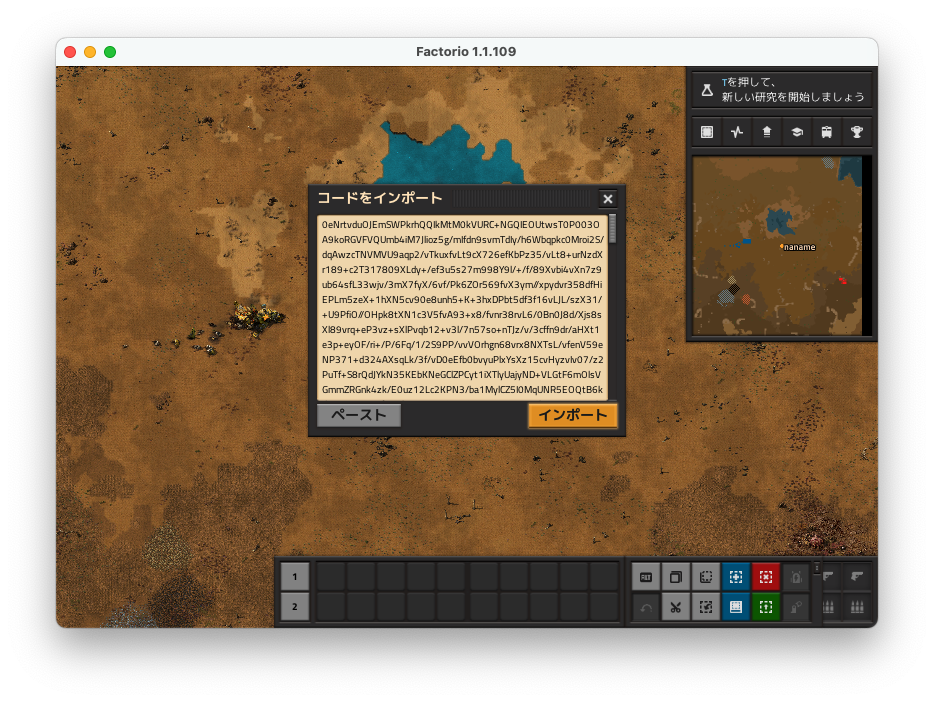
How to Import Blueprints
Importing Blueprints 1. Click "Import Code" (bottom-right, game screen) 2. Paste blueprint code and click "Import" 3. Post-import, transfer to inventory Immediate after-import state shown (left) Move from temporary location to inventory...
welovefactorio.comUsing Visualizers for "Pre-emptive Failure Avoidance"
Massive external designs especially shouldn't go directly to production sites. That's where Blueprint Visualizer helps. As explained in GIGAZINE's write-up, pasting code lets you see overall shape, rail flow, station orientation, junction density—all before importing. Spend 2 minutes looking outside the game.
I preview huge external rail blueprints via Visualizer; returns-to-redo drop sharply. Trains specifically—understanding the layout before placing beats post-placement rebuilds. Visualizer shows "two-way station bundle or single?" "stacker at front?" "signal-cramped?" instantly. Pre-understanding avoids field corrections; giant stations placed correctly first time beat iterative fixes. I've experienced it; pre-viewing into fieldwork had nearly zero rework.
💡 Tip
Larger the design, the bigger the "understand shape first" payoff. Especially stations, power plants, smelter blocks—read-the-layout time saves redo time.
Visualizer doesn't replace organization. Appearance understanding ≠ good naming + proper storage. Role is pre-import safety confirmation + large-design structure reading. That's enough special utility.
{{ogp:https://gigazine.net/news/20211205-factorio-blueprint-visualizer/|GIGAZINE: Factorio Blueprint Visualizer Visualizes Factory Plans Simply|The factory-building sim "Factorio" lets you create blueprints for built structures. Visualizer tool renders blueprints simply—a tool for expressing "
Summary: A Confusion-Free First Book
A confusion-free first book is most stable when you group commonly-used tools into one book and split by function into sub-books. I also started by cramming everything into a single book, but searching caused pauses every time, so splitting clearly improved construction tempo. Rather than aiming for perfect categorization upfront, building a quickly-accessible arrangement first is what works.
Today's to-do is just three things:
- Open your library and move completed Blueprints aside
- Create a common planner book and consolidate planner items
- Reorder by frequency of use and verify with Shift+scroll cycling
For deeper dives, the natural next topics are import organization, creation tips, distribution site selection, and beginner-friendly set design. Once reordering is done, on-site search time drops by roughly half in feel, and the rhythm of place, extend, fix becomes noticeably smoother.
(Note: When articles are created on the current site, add the above slugs as internal links at relevant points in the body text.)
RinSeo
Over 2,000 hours in Factorio. Shares practical logistics and defense know-how drawn from managing train networks with 100+ stations and completing Death World marathon runs.
Related Articles
【Factorio】Differences Between Switch and PC Versions・Operation Tips
【Factorio】Differences Between Switch and PC Versions・Operation Tips
【Factorio】MOD Compatibility Check Guide and Safe Combinations
【Factorio】MOD Compatibility Check Guide and Safe Combinations
Factorio Blueprint Distribution Sites: Top 4 Picks for 2.0【2.0 Compatible】
Factorio Blueprint Distribution Sites: Top 4 Picks for 2.0【2.0 Compatible】
3 Tips for Creating Factorio Blueprints